
PROMPT: Premium Men’s Portrait Collage — Original Face Preservation
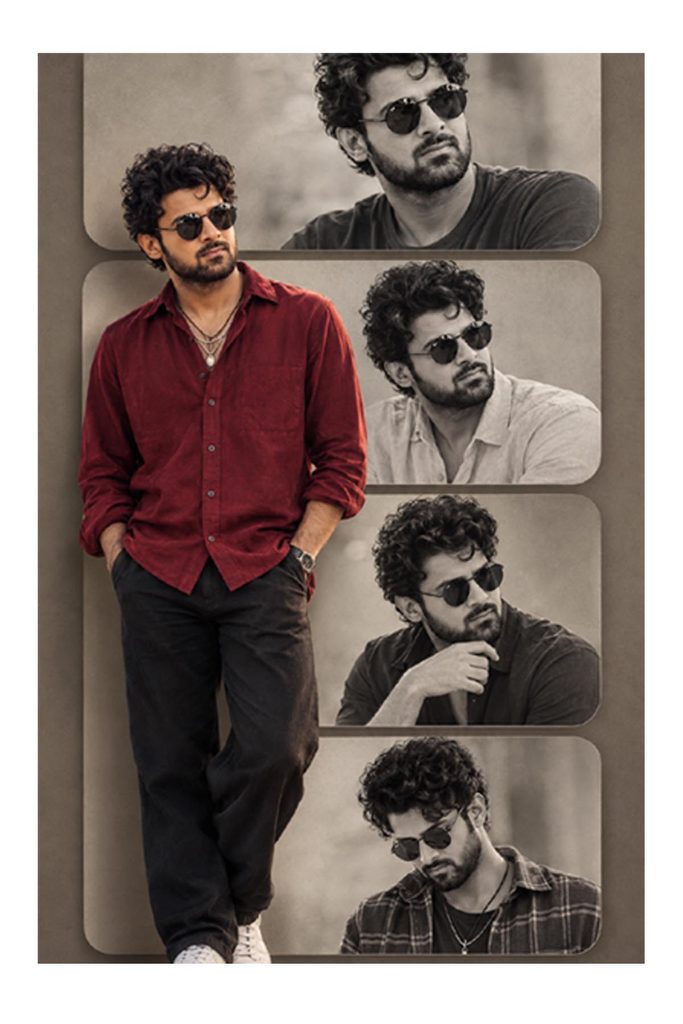
Transform my uploaded photo into a premium, photorealistic men’s fashion portrait collage inspired by the reference image. Use my uploaded photo as the ONLY source of my identity.
1. FACE AND IDENTITY — ABSOLUTE PRIORITY
Preserve my real face and identity exactly as shown in my uploaded photo. Keep my original face shape, eyes, eyebrows, nose, lips, jawline, beard, moustache, skin tone, age, and natural facial details unchanged. Do not replace my face with an AI-generated face. Do not reshape, beautify, de-age, or modify my facial features. Every portrait in the collage must depict the same recognizable person from my original photo.
2. COLLAGE COMPOSITION
Create a stylish vertical fashion poster featuring five coordinated portraits of the same man.
- Main portrait: a large, nearly full-body color portrait positioned slightly left of center, standing confidently with both hands naturally placed in the pockets.
- Top portrait: a large black-and-white close-up with a calm, confident expression.
- Middle-right portrait: a black-and-white three-quarter portrait with the head turned slightly to the side.
- Lower-right portrait: a black-and-white medium portrait wearing a relaxed, elegant pose.
- Bottom portrait: a black-and-white portrait wearing dark sunglasses, with the head slightly tilted downward.
Arrange the background portraits inside separate, softly rounded rectangular panels stacked vertically. Let the main color portrait overlap the panels in the foreground for a premium editorial collage effect.
3. CLOTHING AND STYLING
Dress the main portrait in a rich burgundy-red casual button-up shirt with natural fabric folds, black relaxed-fit trousers, and clean white sneakers. Use a modern, masculine fashion aesthetic. The background portraits can feature a neutral beige or light-colored shirt and a simple dark T-shirt. Keep the same face, hairstyle, beard, and identity in every panel. If preserving my original clothing is preferred, retain my uploaded outfit instead.
4. LIGHTING AND COLOR GRADING
Use soft, diffused studio lighting with gentle shadows and natural skin texture. The main portrait should have rich, realistic colors, a deep burgundy-red shirt, balanced contrast, and subtle highlights in the hair. Render the surrounding portraits in elegant monochrome black and white with detailed grayscale tones. Use a muted taupe, warm gray, and beige background with subtle texture. Add realistic shadows around the rounded panels to create depth.
5. HAIR AND FACIAL DETAILS
Preserve my original hairstyle, hairline, hair length, and hair color. Keep the original beard and moustache shape. Retain natural pores, realistic facial texture, and accurate facial proportions. Do not add a beard, remove facial hair, or invent facial details that are absent from my photo.
6. CAMERA AND IMAGE QUALITY
Professional men’s fashion editorial photography, realistic anatomy, high-resolution details, natural body proportions, premium magazine art direction, balanced composition, subtle cinematic contrast, realistic fabric texture, sharp facial details, vertical 2:3 poster layout.
NEGATIVE PROMPT
Different person, face swap, altered identity, different facial features, changed jawline, changed nose, enlarged eyes, artificial beard, altered hairline, plastic skin, excessive retouching, cartoon, illustration, CGI, distorted hands, extra fingers, duplicate limbs, inconsistent faces, messy collage, incorrect grayscale, text, watermark, logo.
FINAL INSTRUCTION: Use my uploaded photograph as the identity reference for every portrait. Change the composition, outfit, pose, lighting, background, and color grading as needed, but keep my original face recognizable and consistent across all panels. Prioritize identity preservation over stylization.
How to Use This Prompt
Creating your image is simple. Copy the prompt provided above, open your favorite AI image generator, and paste it into the prompt box.
Click the generate button and wait for your image to be created. You can adjust the prompt according to your preferences to achieve different results.
Customize Your Image
You can modify the background, lighting, colors, clothing, camera angle, facial expressions, and other visual details to make your image unique.
Experiment with different settings to discover the style that best matches your creative vision.
Final Thoughts
Try this [Dreamy Aesthetic Girl Photo Collage AI Prompt ] AI image prompt and explore new creative possibilities.
Save your favorite results, experiment with variations, and keep creating amazing visuals with AI. The final output may vary depending on the AI image generator you use.